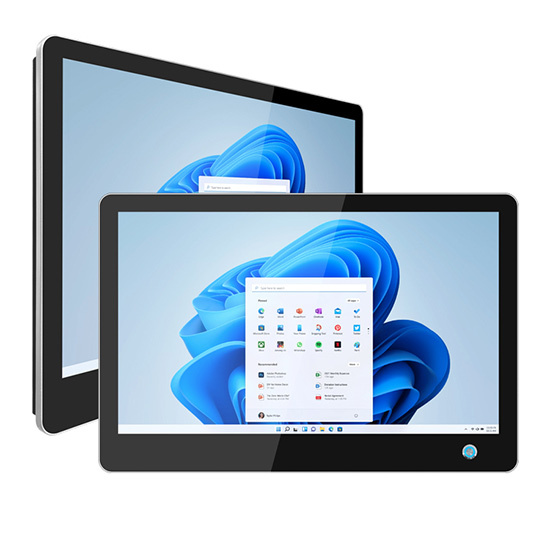
Wall Mounted Industrial Touch Screen | Touchscreen Monitor Windows 10
  • 19 Inch Wall Mounted Industrial Capacitive Touchscreen Monitor Windows 10
  • 19 Inch Wall Mounted Industrial Capacitive Touchscreen Monitor Windows 10

19 Inch Wall Mounted Industrial Capacitive Touchscreen Monitor Windows 10

system:
windows
screen:
capacitive touch
installation:
wall mount
desktop
embedded
  • 19 Inch Wall Mounted Industrial Capacitive Touchscreen Monitor Windows 10

Description

Personalized customization services: We provide customized services, and users can choose different screen sizes, resolutions, materials, etc. according to actual needs.
wall mounted touch screen displayCapacitive touch screen monitor

In the process of industrial automation, 19-inch Touch Screen Monitor plays a vital role. In particular, this 19-inch wall-mounted industrial touchscreen monitor with Windows 10 system stands out among many industrial equipment with its excellent hardware features. ​

Excellent hardware features​

Rugged and durable body: Made of high-quality materials, the 19 inch Touch Screen Monitor  has excellent impact and vibration resistance, and can adapt to various harsh conditions in industrial environments. The front panel usually reaches a higher protection level, such as IP65, which is effectively dustproof and waterproof to prevent dust and water vapor from invading and affecting the normal operation of the equipment.

Clear display effect: Equipped with a 19-inch TFT LCD screen with a resolution of 1280×1024 and above, Industrial Capacitive Touch Screen Monitor provides clear and sharp images and text display. High brightness and high contrast make it easy to see the screen content under different lighting conditions. Wide viewing angle design, whether viewed from the front or side, can maintain good visual effects.​

Sensitive industrial capacitive touch screen: As an Industrial Capacitive Touch Screen Monitor, its touch screen is characterized by high precision and fast response. Supporting multi-touch, it can realize smooth gesture operations such as zooming, dragging, etc. Even when wearing gloves, it can accurately recognize touch commands, which is convenient for practical operations in industrial environments. ​

Rich interfaces: Wall mounted industrial touchscreen has a variety of input and output interfaces, such as VGA, DVI, HDMI, etc., which are convenient for connecting with various industrial equipment. It may also be equipped with a USB interface for connecting external devices or data transmission. ​

Stable power supply: It supports DC12V DC power input, and some models also provide 9~36V wide voltage power input options to adapt to different power supply environments. The standard 100~240V power adapter can meet the usage needs of most regions. ​

Wide range of uses​

Industrial automation control: In factory automation production lines, operators can use this Touch Screen Monitor Windows 10 to intuitively monitor and control production processes, adjust parameters in real time, and improve production efficiency and product quality.​

Intelligent power monitoring: used in the monitoring center of the power system, the staff can use it to view power data and equipment operating status in real time, detect and handle power failures in time, and ensure stable and reliable power supply. ​

CNC equipment operation: used in conjunction with CNC processing equipment, it is convenient for operators to input instructions, edit programs, accurately control the processing process, and improve the accuracy and efficiency of CNC processing. ​

Environmental monitoring system: in the field of environmental monitoring, it can be used to display environmental data, such as air quality and water quality monitoring results, to help staff understand the environmental conditions in time and make corresponding decisions. ​

Traffic monitoring and dispatching: in the traffic command center, dispatchers use the display to view traffic conditions and surveillance camera images, conduct traffic flow dispatching, and ensure smooth roads. ​ 

In short, this 19-inch wall-mounted industrial touch screen display, with its excellent hardware features, provides efficient and reliable display solutions for various application scenarios in the industrial field, helping industrial production to move to a higher level.

FAQ:

1. What harsh industrial environments is this 19-inch Touch Screen Monitor suitable for? ​
The monitor has a sturdy body and a high protection level (such as IP55), which can effectively resist dust, water splashes and slight vibrations. It is suitable for hot, humid, dusty factory workshops, highly corrosive environments such as petrochemicals, and places with frequent vibrations such as mines. ​

2. How does the Touch Screen Monitor Windows 10 perform in terms of operational response? ​
Equipped with Windows 10 system, with industrial capacitive touch screen, it supports multi-touch, fast response speed and precise operation. Even when wearing industrial gloves, it can quickly identify touch commands to ensure smooth interaction in industrial operation scenarios. ​

3. What is the approximate service life of the Industrial Capacitive Touch Screen Monitor? ​
Under normal use and maintenance, its touch screen and display components can work stably for 5-7 years. Regularly cleaning the screen, avoiding scratches with sharp objects, and maintaining a suitable temperature and humidity in the working environment can help extend the service life.​

4. What devices does the monitor support? ​
Equipped with VGA, DVI, HDMI and other video input interfaces, it can easily connect to industrial equipment such as PLC controllers, industrial computers, CNC machine tools, etc.; the USB interface supports connecting external devices such as keyboards, mice, and U disks to meet the needs of data transmission and operation expansion. ​

5. What are the advantages of wide-voltage power input? ​
Supporting DC12V DC and 9-36V wide-voltage power input, it can adapt to unstable power supply environments in different industrial scenarios, avoid equipment failures due to voltage fluctuations, and ensure stable operation of the monitor, especially suitable for remote industrial areas with unstable power supply. ​

6. How to solve the problem of insensitive touch on the monitor? ​
First, check whether it is affected by dust or stains on the screen surface. You can wipe it with a clean soft cloth; if the problem persists, you can recalibrate the touch screen through the built-in calibration program of the monitor; if it still cannot be solved, it is recommended to contact after-sales technicians for inspection. ​

7. Is wall-mounting convenient? What accessories are needed?​
Provides a standard VESA wall-mount interface and is equipped with corresponding screws and other mounting accessories for easy installation. Users can use a universal wall-mount bracket or cantilever bracket to flexibly adjust the position and angle of the monitor to suit different work scenarios.

Download

Leave a message
Name
Email *
Message
WhatsApp
Company
Code Shown *
Verification Code
We use Cookie to improve your online experience. By continuing browsing this website, we assume you agree our use of Cookie.